



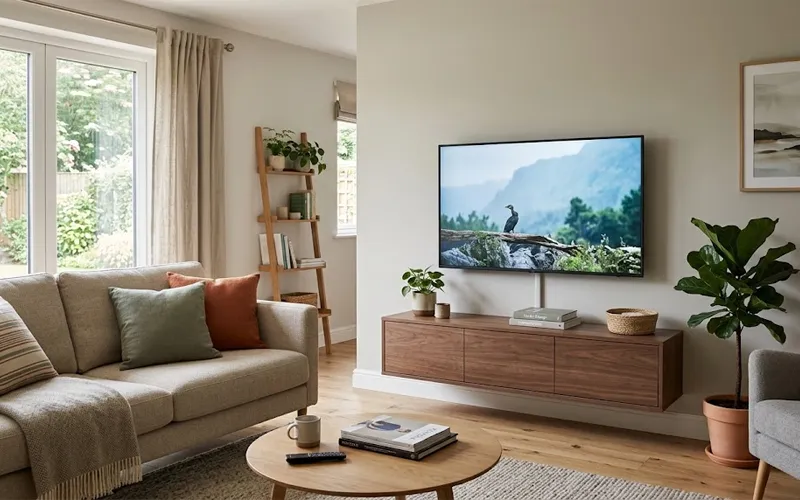
A living room can look untidy even when the furniture, decorations, and flooring are well maintained. Television wires, internet cables, charging cords, and power adapters often create visual clutter, especially in small homes where electronic devices share limited space. Loose wires can make it harder to clean the room and limit how you place your furniture.
Fortunately, organizing cables does not always require new furniture, expensive accessories, or major changes to your home. The right living room cable management ideas can help you create a cleaner entertainment area, make better use of available space, and keep everyday electronics easy to access. The most effective solution depends on the type of cable, the position of your devices, and how you use your living room.
Before choosing accessories, identify where each cable starts and ends. Check which wires belong to your television, router, gaming console, desk, and charging devices. This simple step helps you choose suitable organizers instead of buying products that do not solve your actual problem.
1. Hide TV Wires with Cable Covers
A TV fixed to the wall can make a room feel more open and stylish. However, visible cords hanging below the screen may spoil the clean look of the space. A cable raceway provides a practical way to cover these wires without opening the wall or changing the room’s electrical layout.
A raceway is a narrow channel that holds compatible cables and attaches to a wall or another suitable surface. Some models have adhesive backing, while others use screws. Measure the distance between your television and the intended cable destination before selecting a product. Also, check the channel’s capacity to ensure that all the cables fit without being compressed.
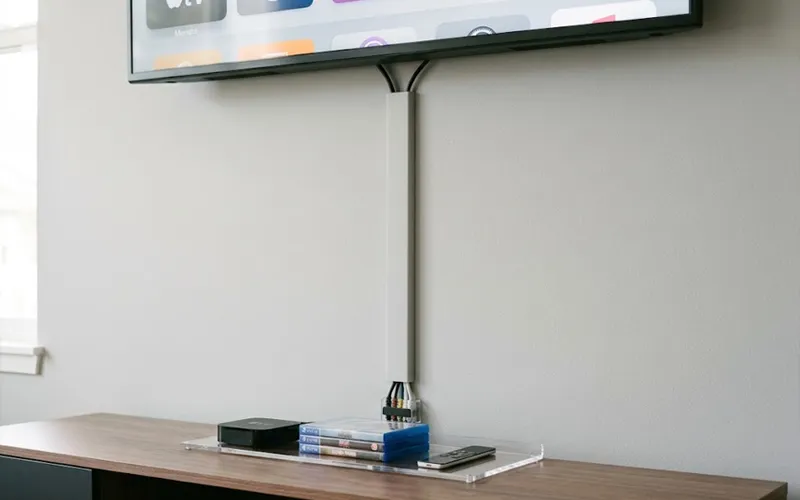
To keep the wires less noticeable, use a cable cover that blends in with the color of your wall. Paintable models can be useful when the available colors do not match your interior. Keep the route straight and use compatible corner accessories when the cable path changes direction.
If you want to know how to hide power cords on wall surfaces, first distinguish between ordinary removable cable covers and permanent in-wall wiring. A surface raceway is suitable for many simple installations, but concealed wiring requires products specifically approved for in-wall use. A qualified electrician can help when the installation involves electrical outlets or permanent wiring changes.
2. Use Furniture to Hide Cables
TV stands, shelves, and cabinets can also help keep your living room neat and organized. A properly designed entertainment unit can provide dedicated spaces for devices, reduce the number of visible wires, and make the living room easier to organize.
When choosing a television stand, look for cable openings at the back, shelves for electronic equipment, and separate compartments for accessories. These features allow wires to pass between shelves without hanging over the sides. In a small apartment, a narrow console with vertical storage may be more practical than a large cabinet that occupies valuable floor space.
Existing furniture can also help. A bookshelf placed beside an entertainment unit may provide a suitable location for a router or media accessories, provided the devices receive enough ventilation. Similarly, a side table can keep frequently used charging equipment in one designated place.
Before changing the furniture layout or purchasing anything new, check how much space you have to work with. Leave enough room for doors, drawers, ventilation, and access to plugs. The goal is to make the layout work with your existing equipment rather than adding more furniture simply to hide a few wires.
3. Organize Wires with Simple DIY Tools
Not every cable problem requires a permanent installation. Small DIY changes can improve the way individual wires are arranged around a television stand, bookshelf, or charging station.
Living room cable management ideas DIY projects can include attaching cable clips to the back of furniture, using reusable hook-and-loop ties to group compatible wires, and adding labels to identify connections. These accessories are especially helpful when several devices share the same entertainment area.
Begin by unplugging equipment when it is safe and appropriate to do so. Before organizing the wires, check where each one goes. This makes it easier to manage connections for your TV, router, game console, and other devices without mixing up the cables. Labels placed near the ends of the cables can make it easier to reconnect equipment after cleaning or moving furniture.
Choose clips that fit the cable’s size and are suitable for the surface where they will be installed. Clean the surface as directed by the manufacturer before applying adhesive products. Avoid tight knots, sharp bends, and fasteners that can cut into cable insulation.
This method works best for managing individual wires rather than hiding an entire collection of power adapters. Once each cable has a clear route, it becomes easier to identify loose connections and replace a damaged wire without disturbing the rest of the setup.
4. Keep Cables Tidy Behind the TV Stand
The area behind a television console often contains several different connections, including HDMI cables, network cables, power leads, and wires for speakers or gaming equipment. When these connections are left tangled, moving a device can pull other cables loose and make troubleshooting unnecessarily difficult.
Instead of treating the back of the console as one large bundle, organize the connections according to their purpose. Keep the cables for each device together where practical, and use separate fastening points to prevent long wires from falling behind the furniture.
A cable sleeve can help manage compatible signal cables that follow the same route. However, avoid placing every wire inside one tightly packed sleeve, especially when the cables have different requirements or belong to equipment that needs ventilation. Power adapters should remain accessible, and plugs should not be forced into crowded spaces.
It is also useful to leave a small amount of appropriate slack near devices that may need to be moved for maintenance. Excess cable should be secured neatly rather than wound into tight loops. Before pushing the console back into position, check that no wire is trapped between the furniture and the wall.
This approach is particularly valuable for households with multiple entertainment devices because it makes future upgrades and equipment changes much easier.
5. Organize Cables Under Your Desk
A desk placed in the living room can introduce a separate set of cable challenges. Laptops, monitors, desk lamps, speakers, and charging equipment may create wires around the work surface and underneath the desk. These cables need to remain organized without restricting normal movement.
Useful cord management ideas for desk setups include under-desk cable trays, desk-mounted cable clips, and a designated charging station. A tray attached beneath a suitable desk can hold compatible cable slack and keep wires from hanging around the user’s legs. Small clips along the rear edge of the desk can guide frequently used charging leads towards their devices.

Position your power strip according to its manufacturer’s instructions and make sure the controls and plugs remain accessible. Arrange cables so that an adjustable chair, keyboard tray, or standing desk mechanism cannot catch or stretch them.
For a compact workspace, consider whether every device needs to remain connected all day. Removing unused accessories from the desk can reduce the number of wires that need to be managed. A docking station or compatible multi-device charger may also reduce cable duplication, provided it supports the equipment’s power and connection requirements.
Keep the work surface itself as simple as possible. When each device has a defined location, its cable can follow a planned route instead of crossing the desk randomly.
6. Use a Box to Hide Power Strips
Power adapters and power strips can occupy a surprising amount of visible space around a television stand or sofa. A purpose-designed cable management box can provide a more organized location for compatible equipment while keeping loose connections from spreading across the floor.
Choose a box that is large enough for the equipment without forcing plugs or cables into a cramped arrangement. Check its ventilation design, dimensions, and intended use before purchasing it. Some boxes are designed mainly for small charging accessories, while others are specifically intended to accommodate a power strip.
Place the box somewhere stable and accessible, away from liquids and locations where it could be kicked or crushed. Do not assume that any ordinary plastic storage container is suitable for electrical equipment. A closed container that traps heat can create problems, particularly when adapters or other components become warm during normal operation.
A cable box is most useful when it contains a clearly defined group of connections. Avoid filling it with unrelated items, spare batteries, paper, or other objects that make inspection difficult. Keep the plugs easy to reach so that equipment can be disconnected when necessary.
For a neat finish, route cables through the box’s designated openings and position the box beside or behind the relevant furniture. This keeps the organizer close to the equipment it serves rather than introducing another visible object into the room.
7. Run Cables Along Walls and Room Edges
Some devices cannot be placed close to a power outlet. Floor lamps, televisions, and network equipment may need cables that travel along part of a wall. In these situations, routing the wires along the room’s edges can make them less noticeable and help keep the central floor area clear.
One of the most creative ways to hide wires on wall surfaces is to use a suitable cable channel that follows the skirting board or the edge where the wall meets the floor. This creates a more deliberate route than allowing a wire to hang diagonally across the wall.
Measure the route carefully and account for doorways, corners, and furniture that may move. Use cable covers designed for the intended application and secure them according to the product instructions. Where a route passes through a doorway, make sure the cover does not interfere with the door or create a raised edge that people could trip over.
For a more permanent result, some homes have skirting boards or trim systems designed with cable channels. These can be worth considering when updating a room, but the channel must be suitable for the type of wiring being installed.
Ordinary extension cords should not be concealed behind permanent wall finishes or used as a substitute for approved in-wall wiring. If you need a new outlet or permanent concealed electrical connections, consult a qualified electrician.
8. Create a Neat Charging Station
Phones, tablets, headphones, smartwatches, and other portable devices can create a collection of charging cables around the sofa or coffee table. Even when each cable is relatively small, leaving them scattered across different surfaces can make the living room look cluttered.
Create one designated charging area using a shelf, side table, or existing console. A multi-device charging station may reduce the number of separate chargers needed, provided it is compatible with the devices and supplies the required power. Cable clips can keep the ends of frequently used charging leads close to the charging surface instead of allowing them to fall behind the furniture.
Choose a location that is convenient for everyday use but does not interfere with walking paths. Keep charging equipment away from drinks, damp surfaces, and places where cables can be pulled accidentally.
If several family members use the same charging area, label the cables or assign each person a specific location. This reduces confusion and makes it easier to return accessories to their proper places.
A dedicated charging station is different from a general cable box because its main purpose is to make everyday connections easy to use. The arrangement should support quick access rather than hide everything out of reach.
9. Keep Cables Safe in the Middle of the Room
Some living rooms have furniture positioned away from the walls. A floor lamp beside a sofa, a projector near the seating area, or an entertainment device placed centrally may require a cable to cross an open part of the room. These layouts need special attention because a loose wire can create a tripping hazard.
The first option is to reconsider the position of the device and nearby furniture. Moving a lamp closer to a suitable outlet or adjusting the seating arrangement may eliminate the need for a cable to cross a walkway. Check the entire route rather than focusing only on the section that is easiest to see.
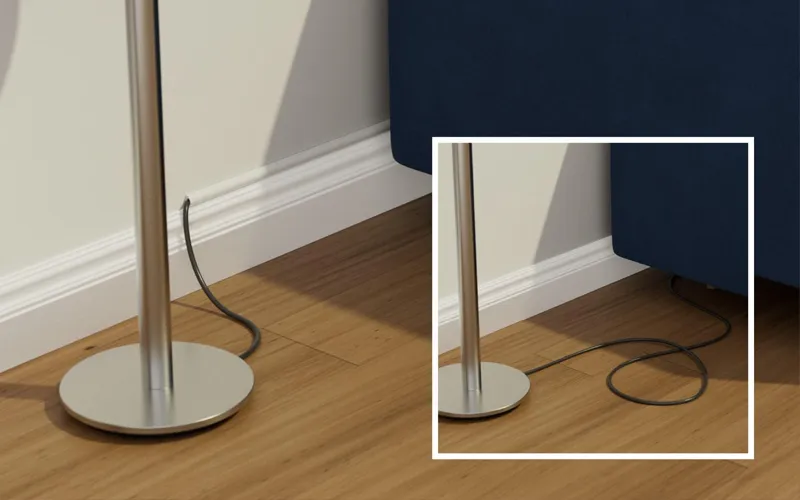
When a cable must cross an accessible floor area, use a purpose-designed floor cable protector that is compatible with the cable and the location. Follow the manufacturer’s instructions regarding cable capacity, floor type, and pedestrian traffic. A suitable protector should keep the cable contained without creating an unstable or unexpected obstacle.
Never run ordinary electrical cords underneath rugs or carpets, where damage and heat can go unnoticed. Avoid placing heavy furniture on cables, and do not use damaged cords or improvised connections to reach a distant outlet.
If you regularly need power in the middle of the room, ask a qualified electrician about a safer permanent solution. A suitable outlet location may be more practical than relying on a long extension cord every day.
10. Plan Cable Routes Before Adding New Devices
Cable management becomes easier when wiring is considered before new electronics or furniture are introduced. Adding a television, speaker system, router, or work device without checking the available connections can lead to unnecessary cables and awkward routes.
Before buying a new device, identify where it will be used and how it will connect to power and other equipment. Check the required cable lengths, the location of available outlets, and whether the device needs a wired network connection. This helps you avoid buying excessively long cables or discovering that an essential connection cannot reach its destination.
For small living room cable management ideas, think about vertical space as well as floor area. Wall shelves, compact entertainment units, and carefully positioned desks can help keep equipment together, reducing the distance between connected devices. However, furniture placement should never block ventilation or make electrical connections difficult to reach.
Keep a simple record of important connections if your entertainment system contains several devices. Knowing which HDMI port, network connection, or power supply belongs to each device can save time when troubleshooting or upgrading equipment.
Finally, review the arrangement whenever you change the room layout. A cable route that worked behind one television stand may become unsuitable after the furniture moves. Regularly checking the setup helps you catch loose clips, damaged insulation, and obstructed connections before they become bigger problems.
Final Thoughts
An organized living room starts with understanding where cables need to go and choosing a suitable solution for each situation. Wall raceways work well for exposed television wires, furniture can provide useful storage, desk trays help manage workspace connections, and dedicated charging stations keep everyday accessories accessible.
Start by addressing the most inconvenient cable problem in your room, then organize the remaining connections according to how frequently you use them. With a clear plan and suitable accessories, you can maintain a more comfortable, functional living room without taking up valuable space or making your electronics difficult to access.
Frequently Asked Questions
1. What are the best living room cable management ideas for small spaces?
Use cable covers, clips, and compact storage units to keep wires organized and reduce clutter.
2. How can I hide TV wires without drilling holes?
Use adhesive cable covers or a TV stand with built-in cable openings.
3. How do I organize cables behind a TV stand?
Group wires with reusable cable ties and keep plugs accessible for easy maintenance.
4. Are DIY cable organizers effective?
Yes, cable clips, labels, and reusable ties are affordable ways to manage loose wires.
5. How can I hide cables under a desk?
Install an under-desk cable tray and use clips to guide wires away from your legs.
6. Is a cable management box safe for power strips?
Yes, if it is designed for electrical accessories, provides proper ventilation, and prevents cables from becoming crowded.
7. How can I prevent cables from becoming tripping hazards?
Keep wires away from walkways or use a suitable floor cable protector when necessary.
8. How often should I check my cables?
Inspect cables regularly for damage, loose connections, and worn-out clips, especially after moving furniture.
Want to read more articles like this? Explore more home improvement ideas, helpful tips, and the latest updates on TrendsMore.com.